
Start with the learner
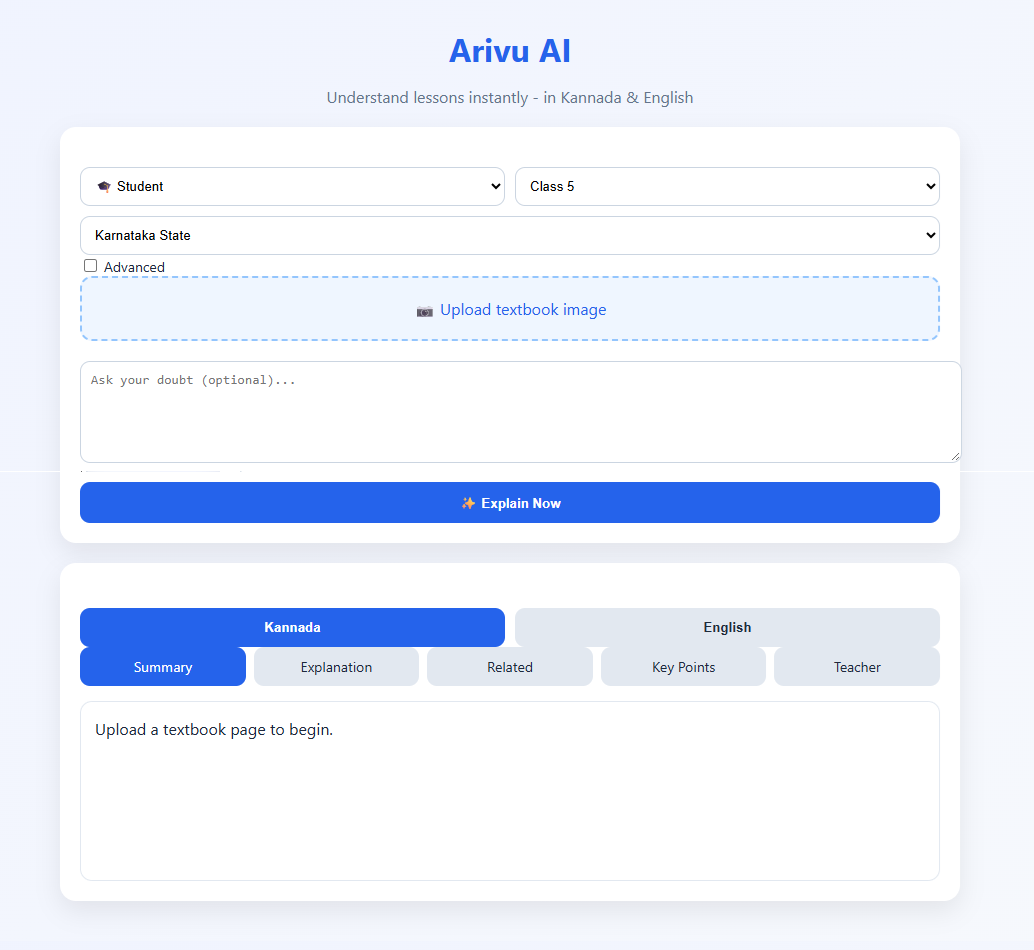
Class selection gives the experience a useful starting point before the student asks a question.
AI / EDUCATION / LIVE PRODUCT
Arivu AI starts from a classroom reality: one explanation does not work for every learner. The interface gives students a clear place to choose their level and ask about a lesson, with Kannada and English in mind.
AUDIENCE
StudentsA learner-first interfaceCONTEXT
Class and languageUseful cues before askingSTATUS
Live productOpen the current experience01 THE CONTEXT
When a student gets stuck, the next step is not always another search result. Long or overly advanced explanations can make a simple doubt harder to work through. A learning tool needs to help the student get to a clearer explanation without adding friction at the start.
The opening flow puts student context up front. A learner can set a class level and then ask about a topic, with the product framed around guided learning rather than conversation for its own sake. The aim is to make the output easier to follow and use while studying.
AI can help explain a topic, but it should support learning-not replace the textbook, classroom or teacher.
02 WHAT MATTERS IN THE BUILD
A learning assistant shaped around student context and structured explanations, rather than a blank chat window and a one-size-fits-all answer.
Class selection gives the experience a useful starting point before the student asks a question.
Kannada and English support are part of the product’s intended learning context.
Structured learning output is more practical for revision than a single undifferentiated block of text.
03 HOW IT COMES TOGETHER
Set the learner and class level.
Describe a lesson, topic or concept that needs attention.
Use the response as a starting point for understanding and examples.
Compare important answers with class material or a teacher.
HAVE A SIMILAR PROBLEM?
Start with the problem, the people involved and what the software needs to make easier. We’ll take it from there.